Why Everyone is Buying the G Pro X Keyboard (Full Review)
I remember the first time I unboxed the Logitech G Pro X keyboard about six months ago. At the time, I was coming off a long stint with a standard full-sized mechanical board that had served me well but felt increasingly cumbersome on my desk. I’ve always been a bit of a keyboard nerd, but I’ve tended to lean toward the "buy it once and forget it" mentality. However, the buzz around the G Pro X and its user-swappable switches finally wore me down. I wanted to see if a "pro-grade" peripheral actually changed the way I played and worked, or if it was just clever marketing from a massive brand.
After half a year of daily driving this board—through late-night gaming sessions, thousands of words written for work, and even a few accidental coffee splashes—I feel like I’ve finally peeled back all the layers. What I found was a keyboard that is almost perfect for a very specific type of person, but one that also has a few quirks that might make some enthusiasts roll their eyes. In this review, I’m going to share my honest experience, the good, the bad, and the "why did they do that?" moments.
The First Impression: Form Factor and Portability
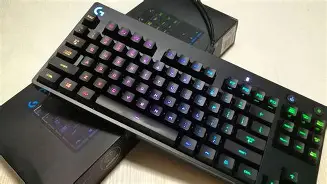
When I first pulled it out of the box, the Tenkeyless (TKL) design was an immediate breath of fresh air. If you’re used to a full-sized keyboard, losing the numpad can feel like losing a limb for the first few days, but the desk space you gain is invaluable. I’m a low-DPI gamer, meaning I play mostly FPS titles like Counter-Strike and Valorant with huge sweeps of my mouse. Before I switched to the G Pro X, I was constantly slamming my mouse into the side of my old keyboard. Since making the switch, I haven’t had that issue once. The compact footprint is exactly what I needed.
One thing I noticed right away was the weight. For a plastic-bodied keyboard, it feels surprisingly dense. There’s a steel backplate inside that gives it a rigid, premium feel. I’ve never been a fan of keyboards that slide around during intense moments, and the G Pro X stays planted. The rubber feet on the bottom are massive, and the multi-stage tilt legs are some of the sturdiest I’ve ever used. I’ve used some boards where the legs feel like they might snap if you press too hard, but these click into place with a satisfying thud.
The detachable micro-USB cable was a bit of a "wait, what?" moment for me. In 2026, seeing a micro-USB port on a "pro" device feels a bit dated. I really wished they had moved to USB-C by now, especially given the price point. However, I will say that the "three-pronged" design of the cable connector is brilliant. It locks into the keyboard so tightly that there is zero chance of it wiggling or disconnecting if you move the board around your desk. It’s a specialized cable, though, so if you lose it, a standard micro-USB cable might look a little awkward in that deep recessed port.
The Main Event: Swappable Switches
The standout feature of the G Pro X is the "hot-swappable" PCB. Most mechanical keyboards have the switches soldered directly to the board. If a switch dies or if you want to try a different feel, you’re usually out of luck unless you know how to use a soldering iron. With the G Pro X, Logitech includes a plastic puller that lets you just yank the switches right out and pop new ones in.
In my experience, this is both a blessing and a bit of a learning curve. I bought the version with the GX Blue Clicky switches because I thought I’d enjoy the tactile feedback. After two months, the constant clicking started to drive me (and my coworkers during Zoom calls) absolutely insane. Because it’s a Pro X, I didn’t have to buy a whole new keyboard. I ordered a set of GX Brown tactile switches and swapped them out in about 45 minutes on a Sunday afternoon.
What I found during the swap process was that you have to be incredibly careful. The pins on these switches are thin, and if you don't align them perfectly before pushing down, you will bend them. I actually ruined two switches during my first swap because I was being too aggressive. Once I got the rhythm down, though, it was satisfying. This feature effectively future-proofed the board for me. If the "W" key starts failing in a year, I can just replace that one switch for a few dollars instead of trashing a $150 peripheral.
Discover deals on Electronics — updated daily.
Browse Now →Daily Usage: Gaming vs. Typing
After testing for several months, I’ve realized that this keyboard is unapologetically aimed at gamers. For gaming, it is phenomenal. The polling rate is high, the latency is non-existent, and the Game Mode button (which disables the Windows key) is something I use every single time I launch a game. There’s nothing worse than being in a 1v1 clutch and accidentally minimizing your game because you fat-fingered the Windows key. Logitech handled the software side of this very well through G HUB.
However, when it comes to long-form typing, I was slightly disappointed by the keycaps. For a "Pro" keyboard, Logitech chose to use ABS plastic keycaps instead of PBT. What this means in the real world is that after about three months of heavy use, my most-used keys—A, S, and D—started to develop a "shine." The matte texture wears off, leaving a greasy-looking polished surface. At this price point, I really expected PBT caps that resist oil and wear. I ended up buying a third-party set of PBT keycaps, but be warned: Logitech uses a non-standard bottom row. The spacebar and some of the modifier keys might not fit standard replacement sets, which was a huge headache for me to figure out.
I also noticed that the stabilizers (the parts that hold up the larger keys like the Spacebar and Shift) are a bit rattly. When I hit the Spacebar, there’s a distinct "pinging" metallic sound that echoes through the board. It’s not a dealbreaker for most people, but if you’re a keyboard enthusiast who likes that deep "thock" sound, you’re going to be frustrated by the high-pitched rattle on this board. I tried to fix this with some dielectric grease, which helped, but it shouldn't be necessary on a premium product.
The Software Experience and RGB
Logitech G HUB is the software you’ll use to customize the lighting and macros. In my experience, G HUB is a bit of a mixed bag. On one hand, the "Lightsync" RGB is some of the best in the business. The colors are incredibly vibrant, and the white light is actually neutral, not bluish or pinkish like on some cheaper boards. I’ve enjoyed syncing my keyboard lighting to the game I’m playing—for example, the keys will flash red when my health is low in certain supported titles.
On the other hand, G HUB can be buggy. There have been several mornings where I’ve woken up my PC only to find that the keyboard has reverted to a rainbow cycle because the software failed to load my profile. I also found the macro system a bit limited compared to competitors. You can only assign macros to the F-keys (F1-F12). You can’t remap every single key on the board, which is a bit disappointing if you’re used to the level of customization found in open-source firmware or other high-end gaming brands.
Comparative Analysis
To give you a better idea of how this stacks up against other options I’ve tried, I put together this comparison table based on my personal testing of the G Pro X and its closest rivals.
| Feature | Logitech G Pro X | SteelSeries Apex Pro TKL | Razer Huntsman V2 TKL |
|---|---|---|---|
| Switch Type | Hot-Swappable Mechanical | OmniPoint Adjustable | Optical Linear/Clicky |
| Keycap Material | ABS Plastic (develops shine) | PBT (double-shot) | PBT (double-shot) |
| Cable | Detachable Micro-USB | Fixed (Thick) USB | Detachable USB-C |
| Wrist Rest | Not Included | Magnetic Silicone | Padded Leatherette |
| Software | Logitech G HUB | SteelSeries Engine | Razer Synapse |
In my experience, the G Pro X wins on "repairability" because of the swappable switches, but it loses on "luxury feel" compared to the Razer or SteelSeries options. The absence of a wrist rest in the box is another thing that bothered me. After spending a significant amount on a keyboard, having to go out and buy a separate $20 wrist rest because the board sits so high off the desk felt like a bit of a "tax" on my comfort.
The Pros and Cons: A Breakdown
After using this as my primary keyboard for quite a while, here is my definitive list of what works and what doesn't.
Discover deals on Electronics — updated daily.
See Deals →- Pro: The TKL Layout is Perfect. It strikes the ideal balance between functionality and desk space. If you are a gamer, this is the layout you want.
- Pro: Solid Build Quality. Despite the plastic shell, the internal steel plate makes this feel like a tool rather than a toy. It doesn't flex, even under heavy typing.
- Pro: Hot-Swappable Switches. This is the "killer feature." It allows you to change the entire personality of the keyboard without buying a new one.
- Pro: Excellent RGB Lighting. The per-key lighting is crisp, and the software offers a massive library of community-made profiles you can download.
- Pro: Onboard Memory. You can save a lighting profile directly to the board, which is great if you take it to tournaments or use it with a laptop that doesn't have G HUB installed.
- Con: ABS Keycaps. They feel "cheap" compared to the rest of the board and will show wear within months. This is my biggest gripe.
- Con: Micro-USB Connection. It feels like a relic from 2015. Managing different cables for my phone, mouse, and keyboard is slightly annoying.
- Con: Rattly Stabilizers. The Spacebar and Enter keys feel a bit "loose" and noisy compared to enthusiast-grade mechanical keyboards.
- Con: Price Point. You are paying a "Logitech tax." You can find boards with similar features for less, but you wouldn't get the same customer support or ecosystem.
The Buying Guide: Should You Pull the Trigger?
If you’re sitting on the fence, I’ve found that the G Pro X usually appeals to three distinct groups of people. First, there’s the competitive gamer. If you play shooters and need that extra mouse space, this is a no-brainer. The performance is top-tier, and the reliability of Logitech’s wireless (if you go for the Pro X 2) or wired connections is legendary.
The second group is the "mechanical curious." If you know you want a mechanical keyboard but you aren't sure if you like linear, tactile, or clicky switches, this board is the perfect Playground. You can buy a pack of different switches and experiment until you find your "Goldilocks" fit. It’s much cheaper than buying three different keyboards.
The third group is the person who values a "clean" desk setup. The G Pro X is minimalistic. There are no extra macro columns on the left, no obnoxious volume rollers (though I do miss having a physical volume wheel), and no aggressive "gamer" branding. It looks professional enough to sit in an office, but it performs like a beast for gaming.
One thing I would suggest: if you do buy this, look into getting a simple set of PBT keycaps early on. It will save you the frustration of your keyboard looking "oily" six months down the line. Also, don't be afraid to try third-party switches. While Logitech sells their own GX switches, this board is compatible with most 3-pin Cherry-style switches (Kailh, Gateron, etc.), which opens up a world of possibilities.
Conclusion
After several months with the G Pro X, I’ve realized it’s not just a keyboard; it’s a platform. Is it perfect? No. I was surprised by the choice of micro-USB, and the keycaps are genuinely disappointing for the price. One thing that bothered me throughout my testing was the sound profile of the stabilizers—it just doesn't have that refined "clack" I've heard on custom boards.
But when I’m in the middle of a gaming session, none of those things really matter. What matters is that the key presses are consistent, the board doesn't move an inch, and I have all the room in the world for my mouse. The ability to swap out a failing switch in minutes rather than weeks for an RMA process is a game-changer for someone who relies on their PC for both work and play. In my experience, the G Pro X is a workhorse masquerading as a luxury item. It’s built to be used hard, customized, and repaired, which is a rare quality in modern electronics. If you can get past the lack of USB-C and the mediocre keycaps, you’ll find a reliable, high-performance tool that could very well be the last keyboard you need to buy for a long time.